
COOKmate - My recipe organizer
Maadinfo ServicesFood & Drink
4.75.59K Reviews
- Version
- Varies With Device
- Installs
- 1.00M
- Age Rating
- Everyone
Screenshots
Our Review of COOKmate - My recipe organizer
 Analysis by Appyee
When I’m trying to decide what to cook, the problem is often not a lack of ideas but the fact that recipes are scattered across browser tabs, saved posts, and scraps of paper. COOKmate - My recipe organizer is designed to bring those finds into one place, so the useful part of collecting recipes can lead more naturally to actually making dinner. I see its main appeal in that practical journey: gather a recipe, find it again, and turn it into a plan for the kitchen.
From scattered recipes to a usable collection
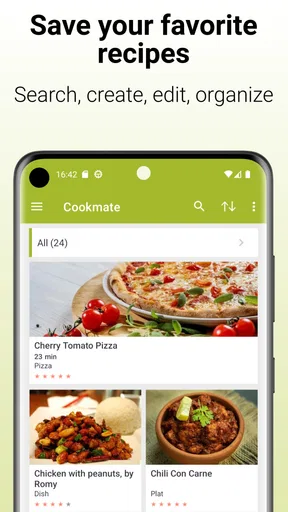
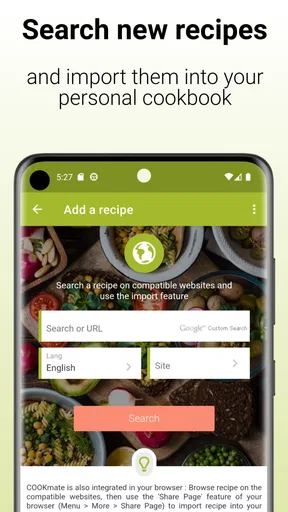
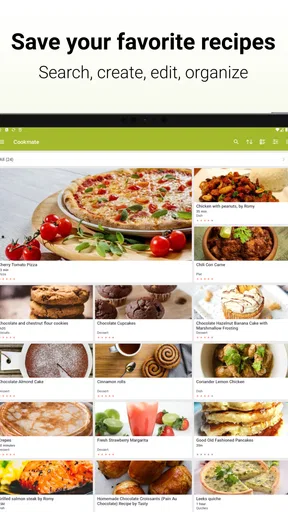
That starting point matters. A recipe manager is most helpful when it fits the way you already discover food, rather than asking you to rebuild your cooking habits from scratch. With COOKmate, I can add a recipe manually or import one from a website, then use search to return to it later. That makes the app a better fit for people who save recipes from several places than for someone who simply wants a new stream of meal inspiration.
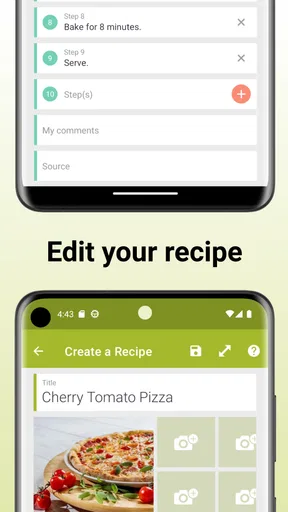
Manual entry is particularly useful for recipes that never lived online in the first place: a family dish written in a notebook, a set of adjustments made over years, or a simple meal you know by heart but want to document. It takes more effort than importing a page, but that effort has a payoff. Once the recipe is recorded, it can sit alongside newer discoveries instead of being forgotten in a drawer.
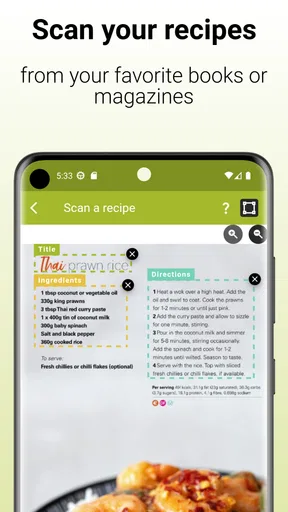
When importing, I would still review the result before relying on it. A webpage can mix its recipe with a long introduction, serving suggestions, or variations, and imported information may need a quick check to make sure the instructions and ingredient amounts are the ones I intended to keep. My practical tip is to treat import as a shortcut for collecting, not as a reason to skip a final read. That small check is especially worthwhile for recipes you plan to cook for guests or add to a regular meal plan.
Moving from saved recipe to dinner plan
Once a recipe is in the collection, search becomes more valuable than it might sound at first. If I have a particular ingredient to use up, looking through saved recipes can help me decide what to make without browsing the web all over again. Tags and dietary needs offer another way to narrow the collection, though the results are only as useful as the details I have entered or kept with each recipe. A thoughtfully organized set of recipes makes search feel like a shortcut; an untidy collection can still leave me scrolling.
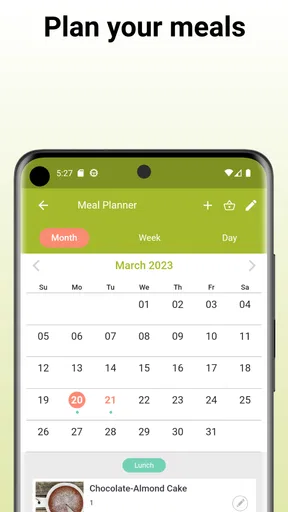
A realistic use is planning a busy week around dishes I already know I can make. I can choose a few recipes, place them into the meal planner, and use their ingredients to prepare a shopping list. That shifts the work from remembering everything on the way to the shop to checking a list before I leave. It does not make the decisions for me, but it gives those decisions a place to live.
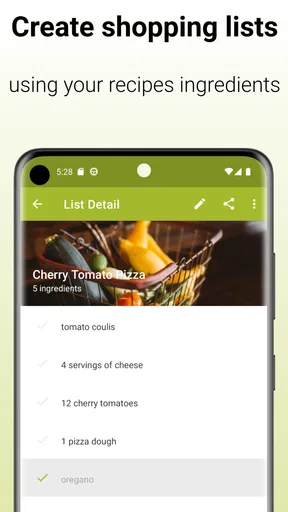
The shopping list is most useful when I build it from the recipes I have selected rather than trying to reconstruct the week from memory. Before shopping, I would scan the list and remove anything already in the cupboard, while checking quantities where a recipe or household need calls for judgment. This is a small but important handoff: the app can gather ingredients, but I still need to make the list match what I actually have at home and how many people I am feeding.
Meal planning also works best as a flexible outline, not a promise that every dinner will happen exactly as planned. If an evening changes, the recipes remain available for another day, and the calendar connection can help keep planned meals visible alongside other commitments. I would use it to reduce the mental load of deciding what is for dinner, while leaving room to swap meals when schedules or appetites change.
Putting the tools to work in everyday cooking
In the kitchen, a saved recipe needs to be easy to recognize and follow. Photos help give a personal collection a visual cue, and they can make it easier to distinguish similar dishes or remember how a meal turned out last time. I would add a picture selectively rather than treating every recipe as a photo project: a clear image is useful when it helps identify the finished dish, while extra decorating can become another task that slows down an otherwise simple workflow.
There is a useful distinction between a recipe archive and a cooking guide. COOKmate helps me store and retrieve recipes, but the quality of the experience depends on how complete and readable my collection is. For a recipe I make often, I would take a moment to preserve the version I actually use, including any changes that matter to me. That is more dependable than assuming I will remember a small adjustment months later.
Where it fits among the usual alternatives
Compared with keeping bookmarks in a browser, a dedicated recipe collection is easier to search as a group and connect to meal planning and shopping. Bookmarks are quick when I only want to save a page and do not mind returning to the original site, but they can become a loose pile when recipes come from many sources. COOKmate makes more sense when I want those finds to become part of an organized cooking routine.
A notes app or paper notebook can be better for someone who wants complete control over formatting and does not need recipe-specific organization. A notebook is also pleasant for cooks who like writing by hand, while a general note can be faster for a single rough idea. The trade-off is that those approaches may require more manual searching and list-making. I would choose COOKmate when recipe retrieval, ingredient lists, and planning are part of the same recurring task, rather than when I only need a place to jot down an occasional cooking thought.
It is also worth separating a recipe manager from a discovery-focused food app. If the main goal is to browse a constant supply of new dishes, a platform centered on recommendations or videos may be more entertaining. COOKmate’s stronger role is keeping recipes I have chosen and making them useful later. That difference helps set expectations: it is less about deciding what I should love and more about helping me manage what I already want to cook.
Who gets the most from it—and who may not
I would recommend it to home cooks who save recipes from websites, keep family favorites, or regularly lose track of what they meant to make. It is especially helpful if meal planning and shopping feel like separate chores that could be linked. Someone cooking for different dietary needs may also appreciate being able to search by relevant details, provided they keep their collection accurately labeled and still check ingredients carefully.
On the other hand, if I cook only a handful of familiar meals and never need to plan or search, a paper list or a basic notes app may be simpler. The setup involved in building a useful library is not worth it for everyone. And if I expect an app to decide what to cook, verify every imported page without review, or replace my judgment at the grocery store, this would not be the right tool. Its value grows with the recipes I save and the care I take organizing them.
There is also a trade-off in relying on a digital collection. Cloud backup can make recipes easier to keep when changing devices, but I would still be deliberate about maintaining the collection and checking that the recipes I care about are present. A backup is reassuring; it is not a substitute for sensible organization. For a family recipe or a dish I make for an important occasion, keeping the instructions clear and complete matters more than simply having a large archive.
Practical details before settling in
COOKmate is a free Food & Drink app from Maadinfo Services, and it is rated for Everyone. Its average rating is 4.7 from around 45,000 ratings, with about 5,500 written reviews and over 1 million installs. In-app purchases range from $2.49 to $104.99 per item, so I would check the app’s current purchase options and what each one includes before deciding whether I need anything beyond the free experience.
The app has been available since July 31, 2010, which gives it a long history as a recipe-organizing option. That history may appeal to someone looking for a focused tool rather than a brand-new social food trend, but I would still judge it by how well its current workflow suits my needs. The key question is not how many recipes I could possibly store; it is whether I will use the collection often enough to make the setup worthwhile.
For a smooth start, I would add a small group of recipes I already cook, import a few dependable online favorites, and test search before moving an entire archive. Then I would plan one or two meals and generate a shopping list, checking it against the pantry. This trial reveals quickly whether the handoffs—from saving, to finding, to planning, to shopping—feel natural in my routine. It also avoids spending an afternoon organizing recipes that I may never use.
Getting Started with COOKmate
First things first, let’s talk about the setup. Downloading COOKmate was a breeze. Available for both Android and iOS, you can grab it from your app store and get cooking in no time. Once installed, the app welcomes you with a clean and inviting interface that feels like a well-organized kitchen.
The app encourages you to create your own digital recipe book, and it’s surprisingly intuitive. You can add recipes manually, which is great if you have a cherished family recipe you want to preserve. Alternatively, COOKmate lets you import recipes directly from websites. Just copy the URL, and the app does the rest. It’s a real time-saver for those of us who love browsing food blogs.
Features that Stand Out
One feature I absolutely love is the shopping list. As someone who often forgets key ingredients, this was a game-changer. You can add ingredients from your recipes directly to a shopping list with a simple tap. No more scribbled notes or forgotten items!
Another nifty feature is the meal planner. It lets you plan your meals for the week, which is perfect if you’re trying to get more organized with your cooking. It even syncs with your calendar, making it easy to stay on track.
The app also supports cloud backup. This means your recipes are safe even if you switch devices. You can access them from anywhere, which is great if you’re cooking at a friend’s house or just showing off your recipe collection.
User Experience
Using COOKmate feels like flipping through a well-loved cookbook. The search function is powerful, allowing you to find recipes by ingredients, tags, or even dietary needs. This is particularly handy if you’re cooking with what you have on hand or catering to specific dietary restrictions.
Adding photos to recipes is another fun touch. It lets you personalize your collection and remember how the dish should look. Plus, it’s a nice way to track your culinary progress.
Community and Support
COOKmate fosters a sense of community with its users. You can share recipes with friends or even explore public recipes shared by others. It’s like having a global potluck right at your fingertips.
If you ever hit a snag, the app offers robust support. There’s a comprehensive FAQ section, and the developers seem responsive to feedback. It’s reassuring to know help is just a click away if needed.
My Final Thoughts
Overall, COOKmate - My recipe organizer has become my go-to kitchen companion. It’s more than just a digital recipe book; it’s a full-fledged organization tool that simplifies meal planning and shopping. Whether you’re a seasoned chef or just starting out, this app has something to offer.
So, if you’re looking to spice up your cooking routine and keep everything neatly organized, give COOKmate a try. It’s like having a personal sous-chef right in your pocket, and who wouldn’t want that? Happy cooking!
Verdict
Strengths of COOKmate - My recipe organizer
- User-friendly interface, easy to navigate.
- Customizable recipe categories for organization.
- Offline access to your saved recipes.
- Ability to import recipes from websites.
- Grocery list feature simplifies shopping.
Limitations of COOKmate - My recipe organizer
- Limited free features, premium required.
- Occasional sync issues across devices.
- No direct video integration for recipes.
- Advertisements in free version can be intrusive.
- Recipe search function can be slow.
Similar Picks in This Category
View All
Rappi: Food Delivery, Grocery
Rappi, Inc - Delivery3.5

McDonald’s: Cupons e Delivery
Arcos Dorados4.3

Swiggy: Food Instamart Dineout
Swiggy4.7

Blinkit: Groceries & more
Blinkit4.8

foodpanda: food & groceries
Foodpanda GmbH a subsidiary of Delivery Hero SE4.0

Zomato: Food Delivery & Dining
Zomato4.7
Frequently Asked Questions
What features does COOKmate offer for organizing recipes?
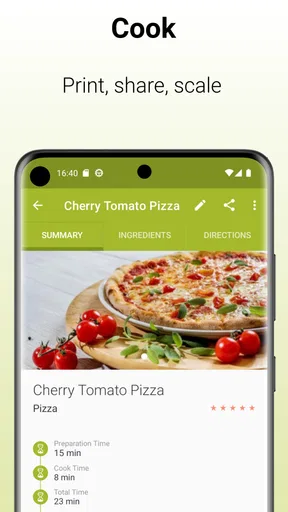
COOKmate provides a comprehensive suite of features for organizing your recipes, including the ability to import recipes from websites, create shopping lists, and categorize recipes by meal type. You can also add personal notes, adjust serving sizes, and use the meal planner to schedule your meals efficiently.
Is COOKmate available for both Android and iOS devices?
Yes, COOKmate is available on both Android and iOS platforms. You can download it from the Google Play Store for Android devices and the Apple App Store for iOS devices. This ensures that users on either platform can enjoy the app's full benefits and features.
Can I use COOKmate offline to access my recipes?
Absolutely! One of the standout features of COOKmate is its offline accessibility. Once you have saved your recipes in the app, you can access them without an internet connection. This is particularly useful when cooking in areas with poor connectivity or traveling.
Does COOKmate support recipe sharing with friends and family?
Yes, COOKmate allows you to easily share your favorite recipes with friends and family. You can send recipes via email or social media platforms directly from the app. This feature makes it simple to spread the joy of cooking and try new dishes with loved ones.
Are there in-app purchases or subscriptions in COOKmate?
COOKmate offers a free version with basic functionalities, but for users seeking advanced features, there is a premium subscription available. The premium version includes features like cloud backup, an ad-free experience, and additional customization options for a small monthly or yearly fee.
